9 min read

Your Ultimate Guide to HubSpot Hubs: Part One

Your Ultimate Guide to HubSpot Hubs: Part One
15:31
 

(So I Guess That Makes This Your Semi-Ultimate Guide)

There are a million apps out there, and every one claims to be all things to all people.

But most of these claims are a little inflated. It’s like a hammer promising it can build you a house — like, no, you can drive the nails home, but I’m also going to need something to set the joists, cut the boards, and lift the trusses!

(Don’t worry, I’m a professional woodworker on the side, so I know what I’m talking about 😉).

When I’m not in my woodshop, though, I’m knee-deep in SMB (small and medium-sized business) tech stacks and software. And if there’s one trend I’ve noticed over the years, it’s the giant, messy agglomeration of apps that all promised to do everything for business owners, only to end up doing one or two things well while creating a much bigger headache.

Every business out there needs some combination of software to keep things running. The exact setup varies, but most SMB tech stacks need to cover the same basic ground: sales, lead management, customer data, marketing, web, and customer service.

So, with that in mind, I give you …

(Drumroll, please.)

HubSpot!

What Is HubSpot?

What Is HubSpot?

HubSpot is about as close to an “all-in-one” solution as I’ve seen. Let’s revisit our earlier construction analogy to think of HubSpot like a toolbelt; it has a hammer loop, sure, but it also has a pocket for a tape measure, a handful of screws, and a whole collection of other tools for different jobs.

And, most importantly of all, you don’t have to cram every tool you own into that one belt. HubSpot plays very well with other software platforms, so you can add other tools where you need them without turning your nice, organized toolbelt into a heap of loose tools on the floor.

So, that’s HubSpot in a nutshell … but where do HubSpot hubs fit into all of this? After all, this is Your Ultimate Guide to HubSpot Hubs, not Your Ultimate Guide to the Whole Entire HubSpot Platform. That would be a novel, not a blog post.

But if you do want to learn more about some of HubSpot’s other tools, here are a few other resources I’ve published:

Hubs are the different pockets of that toolbelt, each built around a specific area of your business. Sales has its own Hub. Marketing has one. Your website has one. Even customer service has one. And within each hub, you’ll find a collection of tools designed to handle the work that falls under that umbrella.

You can use one, a few, or bring multiple hubs together depending on what your business needs.

Now, let’s dig into what each one does, starting with the four I’ve found to be most foundational.

HubSpot Content Hub

#1: HubSpot’s Content Hub

The Content Hub is where you build (and later manage) your business’s assets: your website, your blog, your landing pages, and so on. In layman’s terms, this is your “Stuff” Hub.

Now, there are plenty of ways to build a website. You can use whatever clunky builder that came with your domain, pick something from a Facebook ad with a catchy name like Zippy, Rippy, Wixle, Webbly, Webbie, Wonky, or whatever, roll the dice like countless companies before you and play the “house of a thousand plugins” game on WordPress, or …

… just use HubSpot’s Content Hub. A lot of businesses find this to be refreshingly neat; HubSpot’s Content Hub is secure. It’s stable. It gives your team control over day-to-day updates without requiring someone who speaks fluent code — although, should you ever need to call in a little extra muscle to help with the big-ticket items, HubSpot speaks their language too. 😉

Which Tools Are Tucked Into This Particular Pocket of the Belt?

Depending on your HubSpot tier, the Content Hub can include tools for:

  • Website building and hosting: Build and manage your website using HubSpot’s CMS (Content Management System), themes, and drag-and-drop editing tools.
  • Blogs: Write, optimize, schedule, publish, and track blog content, all from the same platform.
  • Podcast hosting: Create and manage podcast episodes, videos, and other video-based content without adding another platform to the pile.
  • Landing pages: Build dedicated pages for campaigns and lead generation, with more advanced testing and personalization available on higher tiers.
  • SEO: Get recommendations to help optimize your pages and blog posts for discovery.
  • Content personalized to you: The Breeze AI Agent can draft content in your brand’s unique voice.
  • Content personalized to your leads: Use your CRM (Customer Relationship Management) data to tailor content to different visitors.
  • Content repurposing: Turn existing content into new formats and assets with Content Remix; in other words, just one piece of content can be repurposed into summaries, social posts, emails, and more.

HubSpot Sales Hub

#2: HubSpot’s Sales Hub

The Sales Hub is where your sales pipeline lives. With it, you can automate outreach, close deals more efficiently, find prospects, manage leads, track sales — I could go on forever, but essentially, the Sales Hub streamlines the whole sales process.

And I know, I know. You already have a sales process, and it works “just fine.”

… but does it really? Is it well-documented? Like, could you send me your sales process flowchart as a pdf right now? Can you see how many leads entered the sales pipeline? How many of those leads are in each phase of sales? How many sales were closed? How many were lost? Why?

Choose a specific lead; how long did it take to get from one stage of the sales process to the next? Can others see that and measure your success? Do your executives, managers, and marketers all have a view of the data that’s unique to their needs? Can they see whether or not all of the sales people are using the same process? Do they have the ability to compare performances in every phase?

Now look ahead. How many dollars are in your pipeline for next quarter? Who is going to provide service to the clients earned in the recently closed sales? Have they been alerted? Do they have the bandwidth to support these new clients?

See? I told you I could go on and on! But there’s a reason for it. Sales Hub sits at the core of most businesses, and a lot of people don’t realize just how much easier their day-to-day life could be until they hear about everything it can solve.

Which Tools Are Tucked Into This Particular Pocket of the Belt?

Depending on your HubSpot tier, the Sales Hub can include tools for:

  • Organizing daily sales agendas: Sales reps can use the centralized dashboard to view tasks, assigned leads, schedules, and daily priorities.
  • Email automation: Automate email campaigns and follow-up steps, and notify sales reps when prospects open emails.
  • Prospect activity tracking: Automatically notify sales reps when prospects click links or view shared documents.
  • Scheduling meetings: Clients can book meetings with a sales rep via a calendar page that’s synced with the rep’s unique availability.
  • Guided selling: Interactive playbooks and scripts serve as a valuable tool for sales reps.
  • Lead management: Track and understand when prospecting turns contacts into leads and those leads begin warming up toward a deal.
  • Calling & logging: Use HubSpot’s built-in tools to make, record, and log phone calls and emails automatically — no more guessing at which sales rep said what, or when a lead was last contacted!
  • Intelligent forecasting: Use AI-driven insights to predict revenue and sales performance, as well as to research and qualify leads automatically.
  • Deal management: Track pending deals across different stages of the pipelines. Use the visual board to easily see custom stages, amounts, and statuses.

HubSpot Marketing Hub

#3: HubSpot’s Marketing Hub

The third hub we’ll cover in this guide to HubSpot hubs is the Marketing Hub; the Marketing Hub is how you actually fill your sales pipeline. It offers tools for attracting specific, targeted audiences to your business — that way, the leads you’re sending to your sales people are genuinely interested in your products and services.

Now, when most people hear “marketing,” they tend to think of the fun stuff. The campaigns. The clever ideas. The photoshoots, videos, events, merch, messaging, and all the creative pieces that make people stop and pay attention.

And fear not! You still get to do all of that. HubSpot is not going to burst into your brainstorming session to confiscate the markers and start naming your campaigns for you. In fact, the Marketing Hub handles more of the other side of marketing: the automation, the data, the research, the analytics … basically, all those mind-numbing manual tasks required to actually get your brilliant idea in front of the right people (and later figure out whether it worked 😳).

Which Tools Are Tucked Into This Particular Pocket of the Belt?

Depending on your HubSpot tier, the Marketing Hub can include tools for:

  • Social media management: Schedule and publish social media posts across multiple platforms (Facebook, LinkedIn, Instagram, etc.) from just one dashboard; later, view your accounts’ overall analytics, as well as the success of specific campaigns and posts.
  • Lead magnet creation: Build forms, landing pages, and pop-ups to obtain prospect information.
  • Email marketing: Use HubSpot’s drag-and-drop tools to easily design, send, automate, and track emails — best of all, you can check back in after the world has seen your message to see just how many people took action and booked a sales call (or even opened the email in the first place).
  • Audience segmentation: Organize your audience into pools so you can avoid blasting everyone on your list with offers that might only be relevant to a portion of them. For example, you could segment a list of people who filled and then abandoned online shopping carts, that way you can send them a special, enticing coupon.
  • SEO, AEO, and GEO insight: Learn which search engines are bringing people to you, how discoverable you are, and which keywords you should be leveraging.
  • Ad management: Manage digital ads across Google, Facebook, LinkedIn, and Instagram with ROI tracking.
  • CRM integration: Keep track of how individual leads interact with your marketing; group them into specific audiences, and later, connect the dots between the marketing they saw and the sales you eventually made.
  • Campaign management (a.k.a: bringing it all together): Manage all the moving pieces of a marketing campaign from one place. With tools like Marketing Studio, you can visually organize and coordinate all of the assets (the emails, social posts, ads, landing pages, etc.) that all belong to the same campaign.


HubSpot Service Hub

#4: HubSpot’s Service Hub

Now, the Service Hub is how you actually take care of all those new customers. Your Marketing Hub brought them to your website (which lives in the Content Hub), your Sales Hub closed the deal, and now somebody has to make sure your shiny new customer remains a happy customer.

And, just like sales, you probably already have some kind of process for doing that. At the very least, you’re delivering the product or service people paid you for. Otherwise, you probably would’ve gone out of business a while ago. Maybe it’s a beautifully documented system where everyone knows exactly what happens next … or maybe it’s a spreadsheet, somebody’s inbox, and a telephone with the curly handset cord twisted into a ball that will never again be smaller than a softball.

That’s all fine and dandy. Service Hub takes all those things that happen after someone becomes a customer and gives your team a better way to manage and track them. Think support tickets, AI-powered customer service agents, automated satisfaction surveys, onboarding, customer feedback, and all that other stuff.

Which Tools Are Tucked Into This Particular Pocket of the Belt?

Depending on your HubSpot tier, the Service Hub can include tools for:

  • Collecting customer feedback: Send NPS (Net Promoter Score), CSAT (Customer Satisfaction Score), and CES (Customer Effort Score) surveys to measure customer satisfaction and learn more about their experience.
  • Workflow handoff: Seamlessly move work from each person or department to the next throughout the client’s journey to completion.
  • Providing 24/7 support: Use live chat and HubSpot’s AI-powered Customer Agent to answer common questions and help customers in real time.
  • Managing customer requests: Turn questions from emails, chats, and forms into trackable tickets, then assign, prioritize, and route them to the right people.
  • Tracking health scores: Be proactive with your customer service, thanks to HubSpot’s ability to automatically track customer “health” based on their interactions with you.
  • Keeping team conversations organized: Bring customer emails and chats into one shared inbox where your team can view and respond to them together.
  • Creating education resources: Build a knowledge base with FAQs, help articles, and other resources customers can use to find answers on their own.
  • Giving customers the ability to check their ticket’s status: Create a customer portal where clients can view and track their current and past support tickets.
  • Tracking service performance: Monitor ticket volume, response and resolution times, and team performance through reports and dashboards.

See How All the Tools Work Together

The best part about all these HubSpot hubs is how interconnected everything is. Your Content Hub is built into the same HubSpot setup as your CRM, which means the people interacting with your website automatically become part of the same customer data your sales, marketing, and service teams are already working with.

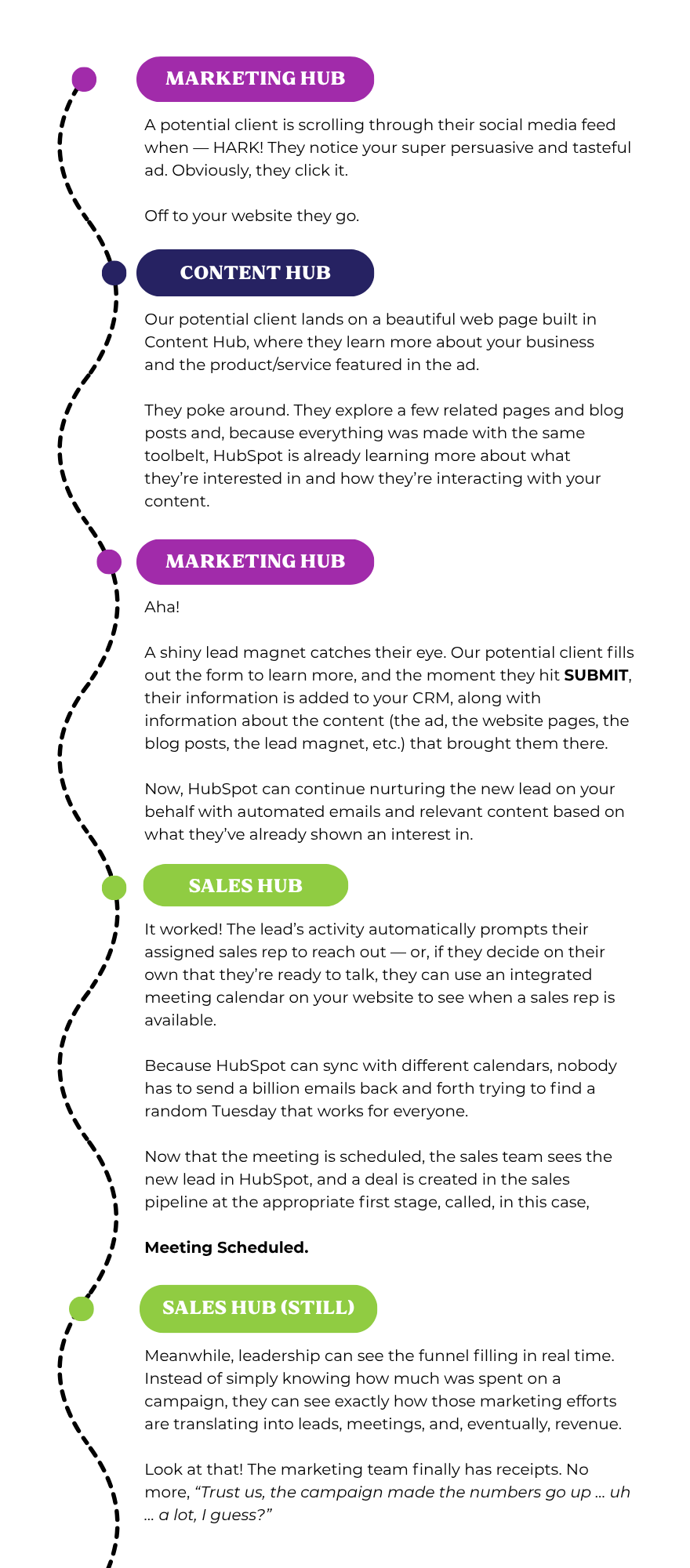
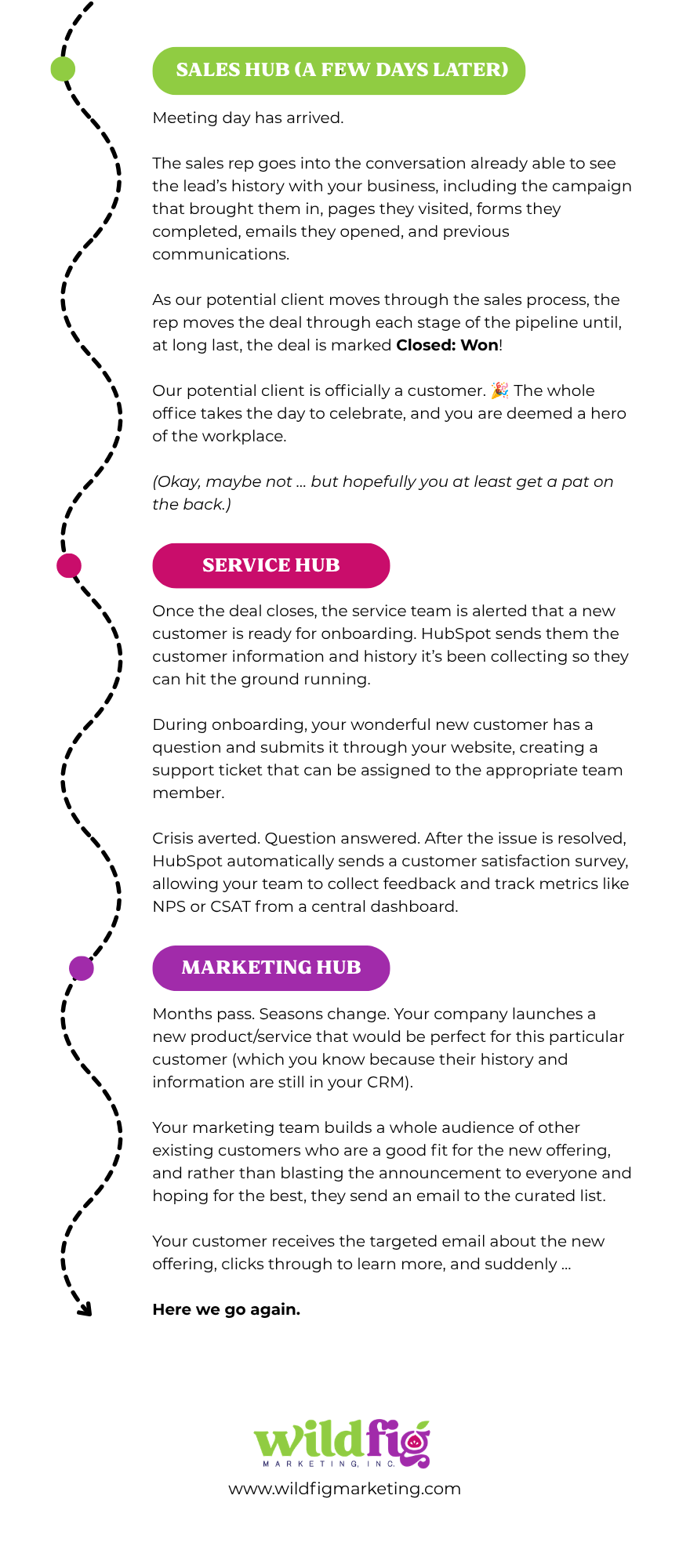
Let me walk you through a normal client lifecycle so you can see how connected the data stays from hub to hub:

HubSpot client lifecycle, page 1

HubSpot client lifecycle, page 2

Hopefully this super-handy visual left you with one clear takeaway: the journey doesn’t restart every time someone moves to a new Hub. The information collected in one stage follows the customer into the next, so the marketing, content, sales, and service teams are working with the same evolving customer relationship rather than four disconnected versions of it.

Guide to HubSpot Hubs

Ready To Clean Up Your Tech Stack?

Part of my job is performing audits to help clients put an end to the 42-application-SMB-stack madness. Because when one interconnected platform can handle your website, marketing, sales, customer service, CRM, and more (remember, this is just part one!), there’s a good chance a few of those 42 applications can finally get the boot.

The other part of my job is helping businesses that already have HubSpot get more out of it. I’ve yet to meet a company whose HubSpot setup couldn’t use something, whether that’s a process rebuild, another hub, better automation, or dashboards that finally give everyone a real-time view of what’s happening and what’s coming next.

So, if reading this Ultimate Guide to HubSpot Hubs has you side-eying your current hobbled-together tech stack and wondering just how much of it could be consolidated into HubSpot, schedule a discovery call with me. We’ll dig into what you’re working with and find out just how much simpler we can make it.

Blog Inline Lead Magnet Promotion Graphics

Why Build Your Website in HubSpot? 7 Benefits of Choosing HubSpot Over the Competition

Why Build Your Website in HubSpot? 7 Benefits of Choosing HubSpot Over the Competition

Considering building a new website for your business? Let's take a look at why you should build your website in HubSpot vs the competition.
Read More
Introducing Loop Marketing: HubSpot’s Solution for Growth in the AI Era

Introducing Loop Marketing: HubSpot’s Solution for Growth in the AI Era

Learn all about HubSpot’s new Loop marketing framework: What it is, how it works, and how it can help you reach more customers in the age of AI.

Read More
10 Key Takeaways From the 2025 HubSpot Inbound Conference

10 Key Takeaways From the 2025 HubSpot Inbound Conference

What we learned at this year’s HubSpot Inbound Conference, from exciting new uses for AI to innovative ways to market your business.

Read More